Extending the Godot Editor: Hoist
At the beginning of 2024, I started writing a plugin for Godot called Hoist. This was going to be a re-imagining of a piece of software I had written profesionally, but for Godot. It’s two years later, and I’ve finally got around to finishing it, thanks to some upstream changes in Godot itself.
The idea is simple: Improve the usability of scenes, by allowing users to “Hoist” properties from child/grandchildren to the root node, so they could be edited in-situ.
Take a scene like this, for instance, with a few children, and a script at the root with some exported properties:
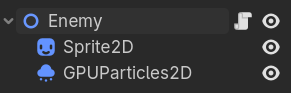

When instantiated, you have easy access to any properties of the root, but not any properties of the children.
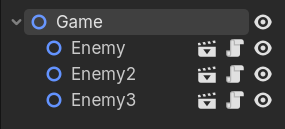
Editable Children
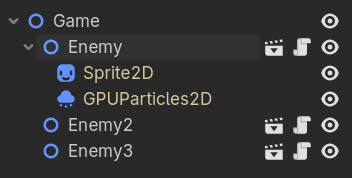
The most straight-forward solution is to check the ‘Editable Children’ checkbox on an instantiated scene. This will expand the list of children, and allow you to edit their properties. This works as advertised, but is… controversial. Mostly due to bugs (e.g., data-loss when renaming nodes), but also because it makes the intended use-case of your scene a bit fuzzy. Editable children makes ALL children and ALL properties editable. Very disagreeable, if only a handful are valid things to edit.
It’s a tough enough dealbreaker, that many people suggest not using editable children at all. There are also some proposals open to improving them.
Forwarding Properties to Children
A generally better, but more verbose approach, requires you to define all valid-to-edit properties on the root of your scene, and then forward them to children. For example:
@onready var foo: Foo = $Foo

@export var bar:
    set(value):
        bar = value
        if foo:
            foo.bar = bar

func _ready() -> void:
    foo.bar = bar
It’s common in these cases to annotate the script with @tool so that the property change can be previewed in-editor.
Hoist
Hoist flips the script, by allowing you to define per property what to expose from children/grandchildren. The exposed properties will appear in their own section on the root node, for editing.
Let’s take our enemy from above. Perhaps it’s valid to edit the texture property of the Sprite2D node, but we shouldn’t touch anything else -nor indeed touch the GPUParticules2D node.
To do that, we need to add @export var hoist : Hoist to our enemy.gd script. This opts-our scene into the hoisting system, and is also used to store some metadata. Children of a scene using hoisting will render an extra checkbox for every property. We can also go-ahead and check the texture property, communicating that it’s valid to edit:
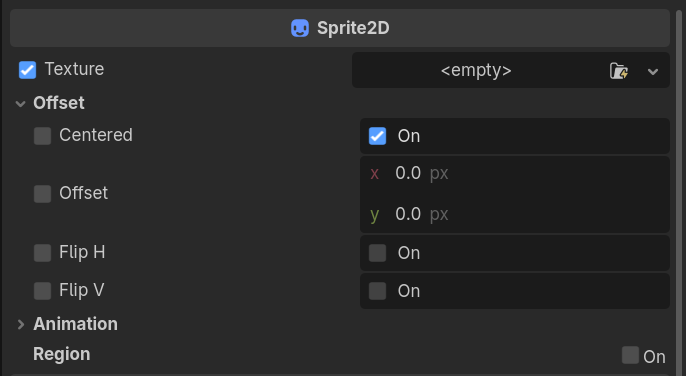
It’s now possible to edit the texture of the enemy from the root:

Limitations
The end result is pretty nifty, but it suffers from a few flaws that limit how useful Hoist is in practice. First and foremost: The editable children checkbox does more than just expand the UI for children nodes; it’s also used as a flag within the serialization system. Without editable children enabled, property changes on children nodes won’t be saved at all. Or in other words, Hoist relies on editable children :(
And worse, it’s reliance on editable children means it inherits all of it’s issues. Like the before-mentioned issue with node renames.
Hoist still provides the ability to clearly document which properties you wish to be editable in an instantiated scene, and it still provides a convenient editor for them, but that’s really all.
A better way?
Hoist fundamentally works by instantiating a new property editor in the root, which is bound to a child object/property combo. So when you change a hoisted variable, you’re well-and-truly changing the property of the child. As mentioned, these properties would be thrown away on save, but during editor time, it’s seemless.
A theoretical extension to Hoist would entail saving the changed value into the Hoist resource (where we already store metadata related to which properties are hoisted). Then during play, these properties could be used to automatically set the children properties. Probably with an API like:
func _ready() -> void:
    hoist.apply_properties()
This feels a little too “black box” to me, but it would allow dropping our usage of editable children!
Hoist under the Hood
Under the hood, hoist uses a combination of tricks. You can peruse the source code at your liesure, but I will cover some of the highlights here.
Hoist (data container)
To mark a scene as accepting of hoisted properties, we had to export a special variable like this: @export var hoist : Hoist. This serves a duel purpose: first, it means we want hoisted vars, and second, it’s the data container we use to actually store the data.
When you mark a property as hoisted, the relationship is stored into this resource, along with enough metadata to re-create the editor it’s representing. If we enable debugging to view the properties of the hoisted resource, it looks something like this:
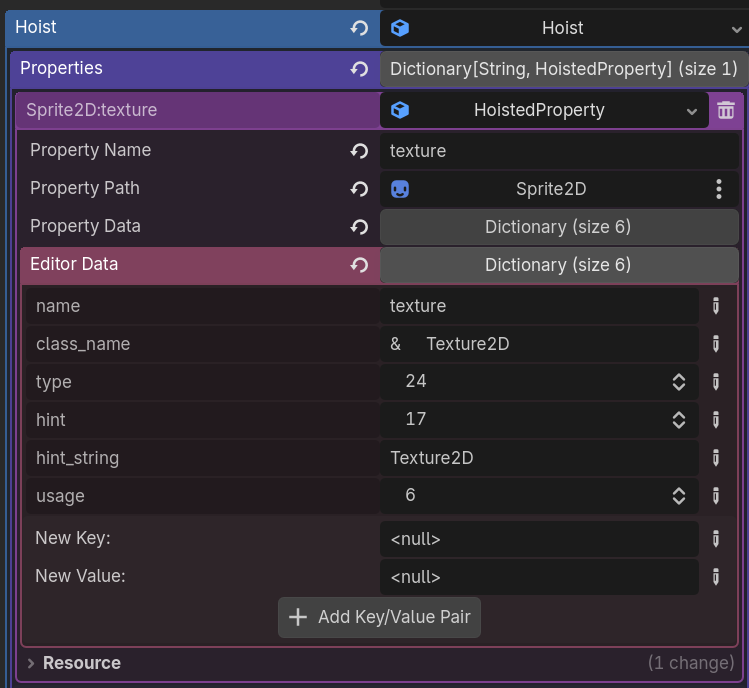
Note: This is almost definitely overkill. Technically it’s possible to re-harvest most of this information later. But for now, it’s implemented like this.
Adding the Checkboxes
Godot offers a fairly easy way to customize the inspector, in the form of EditorInspectorPlugins. We can use one of these to inject the checkboxes.
Since hoist is opt-in, we only inject checkboxes if the scene root exposes Hoist:
func _can_handle(object: Object) -> bool:
	if object is Node and object.owner != null and "hoist" in object.owner:
		return true
	return false
Then, we can use add_custom_control to inject a dummy control. This dummy gives us access to the inspector root node, via get_parent(). Remember: Godot editor is built with Control nodes!
We can recursively search all children to find all instances of EditorProperty, and inject a checkbox to the left. We own everything about this control, so we can bind what happens when the user presses it (namely, adding an entry into the owning-nodes Hoist resource). And that’s it!
The Hoisted Property Editor
A brick wall
This is the portion of Hoist that was the most difficult to write, and the reason it took me two years to finish. In 2024 when I started this project, there simply wasn’t a good way to render a properties panel for an arbitrary property! I made a bit of headway by recreating some simple properties (e.g., EditorBoolProperty). But it was clear from the beginning that this wasn’t sustainable.
I also tried copying the editor properties at runtime. So for example if I knew a correctly configured property existed in the children, why not just copy it, and add a second version in the root? The issue there is that the properties simply didn’t render unless you were focused on that node. So also a dead-end.
My last idea was to use _get_property_list. This magic function allows me to define the metadata of the properties I wanted to appear in the editor. And it was flexible enough that I could trick it into rendering non-owned properties (namely, properties of children/grandchildren). The issue is that it would require a second line when hoisting:
@export var hoist : Hoist
func _get_property_list(): return hoist.get_properties()
I viewed this as a dealbreaker, so I let Hoist go dorment.
The solution
In the end, the solution came in the form of EditorInspector.instantiate_property_editor. I’m not sure exactly when this was added to the Engine, but it’s sometime after I started working on Hoist. This function allows you to get an Editor property of any type just from it’s metadata. Exactly the metadata I had already cached. From there, it was as simple as iterating over all hoisted properties, and adding a property editor for them.
There was actually still a few snags there, but I will cover them in…
Editor Bugs and Missing Features
When you go this far into editing the engine, you’re bound to find all sorts of subtle bugs, warts, and missing features. Here is a hit-list of some of the stuf I ran into. I will open issues or perhaps PRs for some of these:
- Properties with
set_bottom_editordon’t expose ais_bottom_editor. Therefor bottom-editor properties have a miss-aligned checkbox. add_property_editoris only possible for editors of properties of the owning object. I therefor had to useadd_custom_controlwhich has slightly worse DX, such as no filtering.- The above issue with serialization being tied to the editable children checkbox.
- No way to get metadata for a single property. Need to use
get_property_listand then grab the desired property metadata from there.